
Download IMGtopia – AI Image Generator, Free & Secure Tool for Designers
Overview of IMGtopia
IMGtopia is an AI‑driven image generator that transforms simple text prompts into fully rendered graphics in a matter of seconds. The service runs entirely in the browser, meaning there is no need to install bulky desktop software or manage updates. By leveraging state‑of‑the‑art diffusion models, IMGtopia can understand nuanced language, style references, and compositional cues, producing images that range from clean geometric icons to elaborate sci‑fi landscapes.
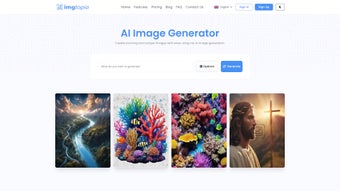
Whether you are a professional designer who needs rapid mock‑ups, a marketer looking for eye‑catching social‑media visuals, or a hobbyist experimenting with AI art, the platform offers a low‑friction experience that does not require prior knowledge of graphic design tools. The interface is clean: a single input field, a resolution selector, and a “Generate” button. After a brief processing period, the result appears on screen with a one‑click download option.
IMGtopia also provides a public gallery where users can showcase their creations and draw inspiration from others. This community aspect encourages creative exchange while keeping the core workflow private for those who need confidentiality. In addition, the platform supports multiple languages, allowing non‑English speakers to craft prompts in their native tongue, which broadens its appeal across global markets.
Overall, IMGtopia balances cutting‑edge AI capabilities with a straightforward, web‑based user experience, making it a compelling choice for anyone who wants to produce high‑quality visuals without the steep learning curve of traditional design suites.
Key Features that Set IMGtopia Apart
- AI‑Powered Text‑to‑Image Engine – Generate visuals from simple keyword prompts.
- Two Native Resolutions – 256 × 256 and 512 × 512 pixels for quick web use or detailed assets.
- Public & Private Visibility – Choose to share creations publicly or keep them private.
- Multi‑Language Support – Interface available in English, Spanish, German, French, and more.
- Account‑Based Enhancements – Unlock batch generation, higher resolutions, and saved galleries after registration.
- Responsive Web Design – Works on desktops, tablets, and smartphones without additional downloads.
- Secure Cloud Processing – All image generation occurs on encrypted servers, ensuring data privacy.
- Free Tier with No Credit Card Required – Immediate access to core features without upfront cost.
- Regular Model Updates – Continuous improvements to image quality and style variety.
- Export Options – Download generated images in PNG format with a single click.
Each feature has been carefully crafted to reduce friction for users at any skill level. The AI engine, for instance, has been trained on millions of images, allowing it to understand context and produce results that feel both imaginative and relevant. The public gallery not only inspires but also serves as a showcase for community creativity, while the private mode guarantees that confidential branding material stays confidential. Because IMGtopia runs entirely in the browser, there’s no need for bulky installations, and the platform automatically adapts to the screen size, delivering a consistent experience on Windows, macOS, Android, and iOS devices. The free tier is generous enough for occasional use, yet power users can quickly scale up by creating an account, unlocking premium tools that streamline large‑scale projects such as batch‑producing social‑media banners or generating a series of product mock‑ups.
Pros
- Instant image generation from text prompts—no design skills required.
- Free tier provides genuine value without credit‑card commitment.
- Fully web‑based, eliminating the need for downloads or updates.
- Multi‑language UI expands accessibility worldwide.
- Secure cloud processing protects user data and generated content.
- Responsive design works seamlessly across Windows, macOS, Android, and iOS.
- Regular AI model updates improve quality over time.
Cons
- Maximum resolution limited to 512 × 512 in the free version.
- Batch generation and higher‑resolution outputs require a registered account.
- Because it is cloud‑based, a stable internet connection is mandatory.
- Fine‑tuned artistic control (e.g., brush strokes, lighting) is limited compared to full‑featured graphics editors.
- Advanced API access is only available in paid plans.
Installation, Usage Guide & Compatibility
IMGtopia is a cloud‑native application, which means there is no traditional installation process. To begin, open any modern web browser—Chrome, Firefox, Edge, or Safari—and navigate to imgtopia.com. The homepage loads in under two seconds on a typical broadband connection, presenting a clean input field where you can type your prompt. After entering a description, select the desired resolution, and click “Generate.” The AI processes the request on secure cloud servers and returns an image within 5‑10 seconds, depending on server load.
Because IMGtopia runs in the cloud, it is compatible with all major operating systems: Windows 10/11, macOS Ventura and later, Linux distributions with a modern browser, as well as Android 8.0+ and iOS 13+. The responsive design ensures that the same workflow works on a 13‑inch laptop, a 10‑inch tablet, or a 6‑inch smartphone without any loss of functionality.
Step‑by‑step usage guide:
- Open your preferred browser and go to imgtopia.com.
- Enter a clear, descriptive keyword or phrase in the “Prompt” field (e.g., “futuristic city at sunset”).
- Select the output size (256 × 256 for quick thumbnails or 512 × 512 for higher detail).
- Choose “Public” if you want your creation to appear in the community gallery, or “Private” for personal use.
- Click the “Generate” button and wait for the AI to render the image.
- When the image appears, use the “Download PNG” button to save it locally, or click “Save to Gallery” if you have an account.
- For batch projects, sign up for a free account, access the “Batch Generator” tab, upload a CSV of prompts, and let IMGtopia handle the rest.
The entire process is designed to be frictionless. No software downloads, no driver installations, and no steep learning curves. For users who require deeper integration—such as automating image creation via API—IMGtopia offers a developer plan (not covered in the free tier) that provides REST endpoints and authentication keys. Security is also a priority; all data transfers are encrypted via HTTPS, and generated images are stored temporarily on secure servers unless you explicitly save them to your account.
Frequently Asked Questions
Is IMGtopia completely free to use?
Yes, the core text‑to‑image generator is free and does not require a credit card. Advanced features such as batch generation and higher resolutions are unlocked after creating a free account.
Do I need to install any software?
No. IMGtopia runs entirely in the browser, so you only need a modern internet‑connected device.
Can I use the generated images for commercial projects?
Absolutely. Images created in the free tier are royalty‑free for both personal and commercial use, provided you comply with the platform’s terms of service.
What browsers are supported?
IMGtopia works on the latest versions of Chrome, Firefox, Edge, and Safari. Older browsers may experience reduced performance.
Is there an API for developers?
Yes, IMGtopia offers a RESTful API in its paid developer plan. This allows automated image generation, bulk requests, and integration with other software pipelines.
Overall, IMGtopia scores a solid 4.5 out of 5. Its ease of use, cross‑platform compatibility, and free access make it a standout choice for anyone needing quick, custom visuals. The primary drawbacks are the resolution ceiling in the free tier and the reliance on an internet connection, but these are acceptable trade‑offs for the convenience and AI quality offered.
Conclusion & Call to Action
IMGtopia delivers on its promise of a fast, secure, and user‑friendly AI image generator. Whether you’re drafting social‑media graphics, creating placeholders for UI mock‑ups, or exploring artistic concepts, the platform’s intuitive prompt system and cross‑device compatibility make it a valuable addition to any creative toolkit. The free tier is generous enough for occasional use, while optional account upgrades provide scalability for professionals who need batch processing or higher‑resolution assets.
By removing the need for traditional design software, IMGtopia saves time, reduces costs, and opens up visual creation to a broader audience. Ready to transform your ideas into striking visuals in seconds? Visit IMGtopia today, generate your first image, and experience the future of graphic creation without the hassle of complex applications.